HomeLivingEmporium
PULWTOP USB C Docking Station 11 In 1 With Dual 4K HDMI 60Hz Outputs 2 USB C 10Gbps Ports And Power Delivery
PULWTOP USB C Docking Station 11 In 1 With Dual 4K HDMI 60Hz Outputs 2 USB C 10Gbps Ports And Power Delivery
Couldn't load pickup availability
Declutter your desk and sharpen your visuals with the PULWTOP 11-in-1 USB-C Docking Station, designed around two HDMI outputs to power your preferred display setup—from mirroring to extended desktop across a TV, monitor, or projector.
Dual 4K HDMI Outputs for Maximum Flexibility
- Two HDMI ports deliver 4K resolution at 60 Hz, enabling crisp, cinematic playback or expansive design canvases on external displays.
- Mirror or extend your content across a TV, monitor, or projector with seamless synchronization.
High‑Speed Data, Fast Charging, and Broad Connectivity
- Two USB-C ports with 10Gbps data transfer ensure quick file moves and responsive peripherals.
- One USB-A 10Gbps and one USB-A 2.0 port cover a wide range of devices and accessories.
- Power delivery up to 100W input, with safe up to 95W delivered to your laptop (65W+ power adapter required) — so you can keep working without swapping chargers.
Ready Media and Network Options
- SD and Micro SD card reader for fast media transfers and easy cataloging of photos and footage.
- Gigabit Ethernet RJ45 port provides stable, low-latency wired networking for video calls, large file transfers, or streaming.
Space-Saving Design and Platform Notes
- The unit also doubles as a space-saving stand, helping your workstation stay tidy while you work.
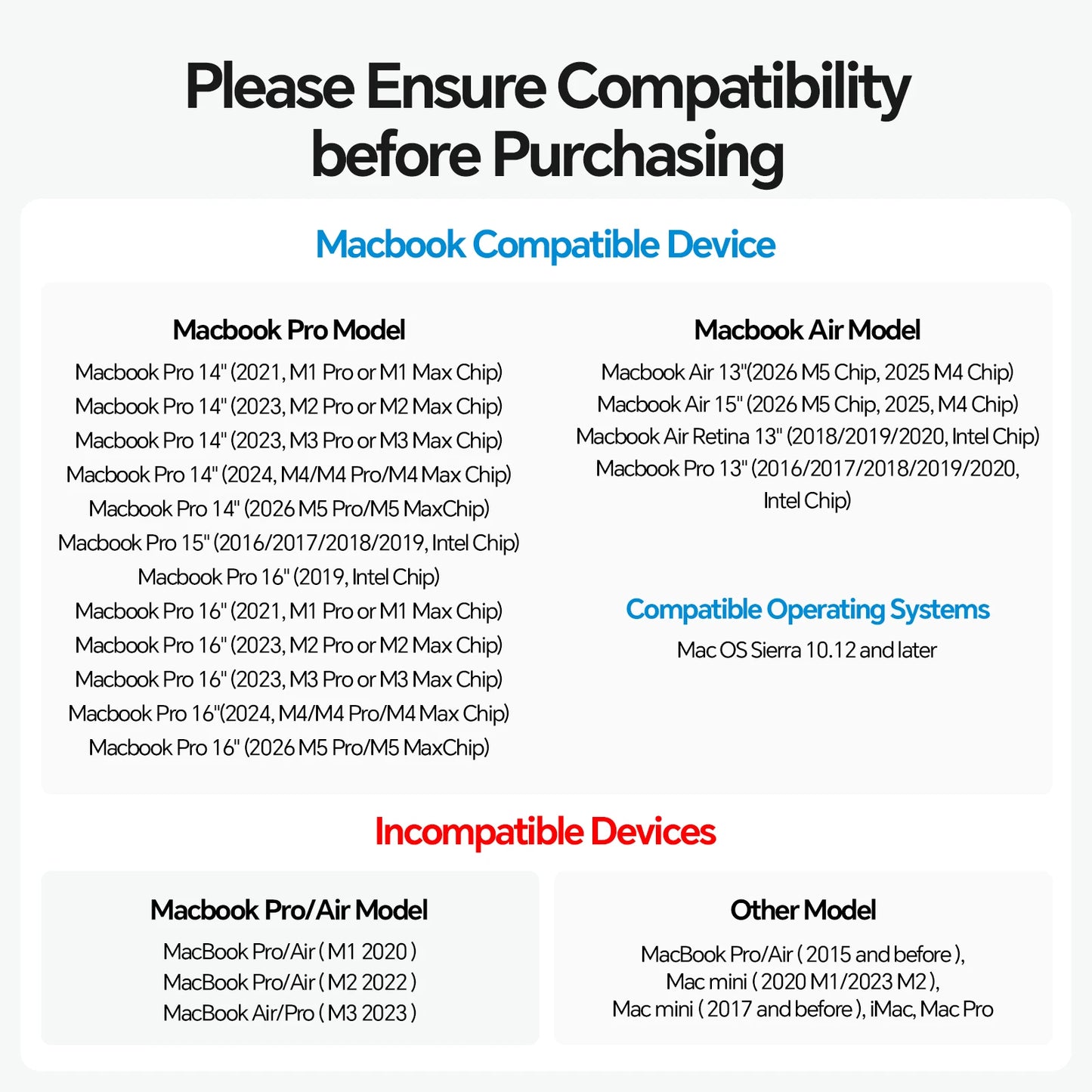
- Mac-focused compatibility with important caveats: not compatible with Windows laptops. MacBook models with M1/M2/M3 chips can extend only one monitor via the dual USB-C host ports.
Use cases: create a clean, productive workspace at home or in the office by driving a 4K external display for design or video work, while running peripherals, fast data transfers, and wired networking from a single hub. If you’re a MacBook user with M1/M2/M3 chips, plan for expanding to a single external display and leverage the dock’s other ports for storage, networking, and peripherals. For Windows laptops, this dock isn’t compatible, so choose a model tailored to that ecosystem.
Share